Serve t5-small on Kubernetes for ML Inference
This blog covers how I built the following playground from scratch: https://ilyasahsan.xyz/t5-small
Introduction
This is a guidance on how I deployed an inference service using the t5-small machine learning model.
There is no token cost because the machine learning model is running within my Kubernetes cluster.
Prerequisites
- Kubernetes cluster
- Helm
- Kubernetes CLI
Architecture Overview
Everything runs on one Kubernetes cluster (K3s) on a single Hetzner VM.
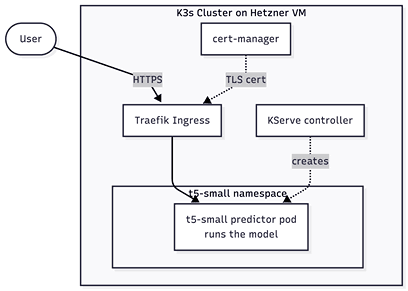
- cert-manager — issues TLS certificates for HTTPS.
- KServe namespace — the control plane; apply the
inference-service.yamlinto a running model server. - t5-small namespace — where the model actually runs and serves requests.
- Traefik — the load balancer handle the network.
Step 1: Deploy Required Helm Chart Packages
install cert-manager
helm install cert-manager jetstack/cert-manager \
    --namespace cert-manager \
    --create-namespace \
    --set crds.enabled=true
install kserve-crd
helm install kserve-crd oci://ghcr.io/kserve/charts/kserve-crd \
    -n kserve \
    --version v0.18.0 \
    --create-namespace
install kserve-resources
helm install kserve oci://ghcr.io/kserve/charts/kserve-resources \
    -n kserve \
    --version v0.18.0 \
    --set kserve.controller.deploymentMode=Standard \
    --set kserve.controller.gateway.ingressGateway.enableGatewayApi=true \
    --set kserve.controller.gateway.ingressGateway.kserveGateway=kserve/kserve-ingress-gateway
Ensure these installed packages running with the following command:
kubectl wait --for=condition=Ready pods --all -n cert-manager --timeout=300s
kubectl wait --for=condition=Ready pods --all -n kserve --timeout=300s
Step 2: Create Kubernetes Manifest files
Create the following YAML files:
namespace-t5-small.yamlcertificate.yamlinference-service.yamlingress.yamlserving-runtime.yaml
The content of each file are follows:
file: namespace-t5-small.yaml
apiVersion: v1
kind: Namespace
metadata:
  name: t5-small
file: certificate.yaml
apiVersion: cert-manager.io/v1
kind: Certificate
metadata:
  name: ilyasahsan-xyz
  namespace: t5-small
spec:
  secretName: ilyasahsan-xyz-tls
  dnsNames:
    - ilyasahsan.xyz
  issuerRef:
    name: letsencrypt-prod
    kind: ClusterIssuer
file: inference-service.yaml
apiVersion: serving.kserve.io/v1beta1
kind: InferenceService
metadata:
  name: t5-small-inference
  namespace: t5-small
  annotations:
    serving.kserve.io/deploymentMode: RawDeployment
spec:
  predictor:
    model:
      modelFormat:
        name: huggingface
      args:
        - --model_name=t5-small
        - --model_id=google-t5/t5-small
        - --dtype=float32
        - --backend=huggingface
file: ingress.yaml
apiVersion: traefik.io/v1alpha1
kind: Middleware
metadata:
  name: t5-small-stripprefix
  namespace: t5-small
spec:
  stripPrefix:
    prefixes:
      - /t5-small/inference
---
apiVersion: traefik.io/v1alpha1
kind: IngressRoute
metadata:
  name: t5-small
  namespace: t5-small
spec:
  entryPoints:
    - websecure
  routes:
    - match: Host(`ilyasahsan.xyz`) && PathPrefix(`/t5-small/inference`)
      kind: Rule
      middlewares:
        - name: t5-small-stripprefix
      services:
        - name: t5-small-inference-predictor
          port: 80
  tls:
    secretName: ilyasahsan-xyz-tls
file: serving-runtime.yaml
apiVersion: serving.kserve.io/v1alpha1
kind: ServingRuntime
metadata:
  name: kserve-huggingfaceserver
  namespace: t5-small
spec:
  supportedModelFormats:
    - name: huggingface
      version: "1"
      autoSelect: true
      priority: 1
  protocolVersions:
    - v1
    - v2
  containers:
    - name: kserve-container
      image: kserve/huggingfaceserver:v0.15.2
      args:
        - --model_name={{.Name}}
        - --model_dir=/mnt/models
        - --http_port=8080
      resources:
        requests:
          cpu: "250m"
          memory: "512Mi"
        limits:
          cpu: "1"
          memory: "1Gi"
Step 3: Apply the Kubernetes Manifests.
Create a Kubernetes Namespace
kubectl apply -f default/namespace-t5-small.yaml
Apply the manifest
kubectl apply -f <path-to-manifest-directory>
Ensure the inference service running with the following command:
kubectl wait --for=condition=Ready pods --all -n t5-small --timeout=300s
Conclusion
Test the inference service to translate a simple sentence with the following command:
curl -s https://ilyasahsan.xyz/t5-small/inference/openai/v1/completions \
  -H 'Content-Type: application/json' \
  -d '{"model": "t5-small", "prompt": "translate English to German: The house is wonderful.", "stream":false, "max_tokens": 30 }'
Or you can access the playground on the following link
https://ilyasahsan.xyz/t5-small
References
- Research: exploring-transfer-learning-with-t5-the-text-to-text-transfer-transformer
- Machine Learning Model: t5-small
- Inference Platform: KServe
- Serving Runtime: huggingfaceserver