Self-Hosted LLM Inference
No OpenAI. No Claude. No API keys.
Just a small transformer-based language model, a lightweight vector database, and a few services, all running inside a small Kubernetes cluster.
Of course, the LLM's answers aren't great.
Try the demo at: https://ilyasahsan.xyz/chat-server
Disclaimer
This post is long and goes through a lot of code. Take your time reading it.
Don't use this for production. It uses a simple approach to build and deploy the app on a Kubernetes cluster.
The LLM is only meant to answer questions from the knowledge base below (details here):
- Messi scored a hat trick in the World Cup 2026
- Cristiano Ronaldo scored a brace in the World Cup 2026
Architecture
Find the architecture below:

plantuml-architecture
%%{init: {'theme': 'neutral'}}%%
graph LR
    User((User))
    ChatSvc[Chat Service]
    EmbedSvc[Embedding Service]
    Chroma[(ChromaDB)]
    LLMSvc[LLM Service]
    Docs[Documents]

    User -->|query| ChatSvc
    ChatSvc -->|query| EmbedSvc
    EmbedSvc -->|search| Chroma
    Chroma -->|results| LLMSvc
    LLMSvc -->|response| ChatSvc
    ChatSvc -->|response| User

    Docs -->|batch job| EmbedSvc
    EmbedSvc -->|insert embeddings| Chroma
Components
- ChromaDB. Stores the documents.
- Embedding Service. Converts documents and queries into embeddings.
- LLM Service. Generates a text answer using the context retrieved from the vector database.
- Chat Service. Serves the user interface and talks to the embedding service.
Find the sequence diagram below:
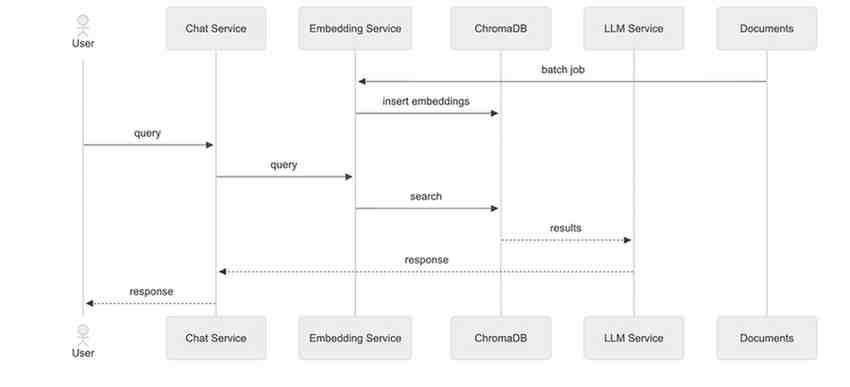
plantuml-sequence-diagram
%%{init: {'theme': 'neutral'}}%%
sequenceDiagram
    actor User
    participant ChatSvc as Chat Service
    participant EmbedSvc as Embedding Service
    participant Chroma as ChromaDB
    participant LLMSvc as LLM Service
    participant Docs as Documents

    Docs->>EmbedSvc: batch job
    EmbedSvc->>Chroma: insert embeddings

    User->>ChatSvc: query
    ChatSvc->>EmbedSvc: query
    EmbedSvc->>Chroma: search
    Chroma-->>LLMSvc: results
    LLMSvc-->>ChatSvc: response
    ChatSvc-->>User: response
Prerequisites
Convert the following models into GGUF (GPT-Generated Unified Format).
- Embedding model: all-MiniLM-L6-v2
- Language model: SmolLM2-135M-Instruct
Find the commands below:
# Step 1. Install the Huggingface CLI and Login with token.
brew install hf
hf auth login --token <HUGGINGFACE_TOKEN>

# Step 2. Download the Models into the local machine.
hf download sentence-transformers/all-MiniLM-L6-v2 --local-dir ./all-MiniLM-L6-v2
hf download HuggingFaceTB/SmolLM2-135M-Instruct --local-dir ./SmolLM2-135M-Instruct

# Step 3. Clone the llama.cpp repository.
git clone git@github.com:ggml-org/llama.cpp.git
cd llama.cpp

# Step 4. Convert the Models into the GGUF format.
python convert_hf_to_gguf.py ./all-MiniLM-L6-v2 --outfile ~/Downloads/all-MiniLM-L6-v2-f16.gguf --outtype f16
python convert_hf_to_gguf.py ./SmolLM2-135M-Instruct --outfile ~/Downloads/SmolLM2-135M-Instruct.gguf --outtype f16
After that, upload the converted files to a HuggingFace repository. Here are the links:
- SmolLM2-135M-Instruct: SmolLM2-135M-Instruct-Q4_K_M.gguf
- all-MiniLM-L6-v2: main/all-MiniLM-L6-v2-f16.gguf
ChromaDB
ChromaDB is used to store the vectorized documents. I chose it because it's lightweight, so it only needs a small amount of resources in the Kubernetes cluster.
Find the details below:
containers:
  - name: chroma
    image: chromadb/chroma:1.5.9
    ports:
      - containerPort: 8000
    volumeMounts:
      - name: data
        mountPath: /data
volumes:
  - name: data
    persistentVolumeClaim:
      claimName: chroma-data
Result
As a result, the vector database is now running. You can check it with the steps below:
Step 1. Port-forward to the Pod.
$ kubectl port-forward <pod-name> 8000:8000 -n chroma
Step 2. Create a Python file named main.py.
import chromadb


client = chromadb.HttpClient(host="localhost", port=8000)
heartbeat = client.heartbeat()

print("connection successfull! heartbeat:", heartbeat)
Step 3. Run the Python script.
$ python main.py

#connection successfull! heartbeat: 1782884143114295348
Embedding Service
The embedding service uses the llama.cpp server to convert documents into embeddings. It uses the all-MiniLM-L6-v2 model, converted into GGUF format.
Find the details below:
containers:
  - name: server
    image: ghcr.io/ggml-org/llama.cpp:server
    ports:
      - containerPort: 8080
    env:
      - name: LLAMA_ARG_MODEL_URL
        value: https://huggingface.co/ilyasahsan/GGUF/resolve/main/all-MiniLM-L6-v2-f16.gguf
      - name: LLAMA_ARG_EMBEDDINGS
        value: "1"
      - name: LLAMA_ARG_CTX_SIZE
        value: "256"
      - name: LLAMA_ARG_UI
        value: "0"
    resources:
      requests:
        cpu: "200m"
        memory: "200Mi"
      limits:
        cpu: "250m"
        memory: "256Mi"
Result
As a result, the embedding service is now running. Run the command below to vectorize the text hello world:
curl -X POST 'https://ilyasahsan.xyz/embed-server/v1/embeddings' \
-H "Content-Type: application/json" \
-d '{"input": "hello world", "model": "all-MiniLM-L6-v2"}'
The response is below:
{
  "model": "all-MiniLM-L6-v2",
  "object": "list",
  "usage": {
    "prompt_tokens": 4,
    "total_tokens": 4
  },
  "data": [
    {
      "embedding": [
        -0.034432303,
        0.030898789,
        0.006729783,
        0.026091516,
        "... (384 dims total)"
      ]
    }
  ]
}
Extras
We can create a custom class that implements the EmbeddingFunction protocol.
This class calls the embedding service, and we can pass it to ChromaDB when creating the client.
See the details below:
import os, json, httpx, chromadb
from chromadb import Documents, EmbeddingFunction
from chromadb.utils.embedding_functions import register_embedding_function

@register_embedding_function
class RemoteEmbeddingFunction(EmbeddingFunction):
    def __call__(self, texts: Documents):
        resp = httpx.post(
            "https://ilyasahsan.xyz/embed-server/v1/embeddings",
            json={"input": list(texts), "model": "all-MiniLM-L6-v2"},
        )
        data = sorted(resp.json()["data"], key=lambda d: d["index"])
        return [d["embedding"] for d in data]

    @staticmethod
    def name():
        return "embed-server"
LLM Service
This service uses a language model called SmolLM2-135M-Instruct, which generates text and answers questions based on the results from the vector database.
It also runs on small resources, which makes it a good fit for my own Kubernetes cluster.
Find the details below:
containers:
  - name: server
    image: ghcr.io/ggml-org/llama.cpp:server
    ports:
      - containerPort: 8080
    env:
      - name: LLAMA_ARG_MODEL_URL
        value: https://huggingface.co/ilyasahsan/GGUF/resolve/main/SmolLM2-135M-Instruct-Q4_K_M.gguf
      - name: LLAMA_ARG_CTX_SIZE
        value: "1024"
      - name: LLAMA_ARG_UI
        value: "0"
    resources:
      requests:
        cpu: "250m"
        memory: "200Mi"
      limits:
        cpu: "500m"
        memory: "256Mi"
Result
As a result, the LLM service is now running and can answer basic questions. Find the details below:
curl -X POST https://ilyasahsan.xyz/llm-server/v1/chat/completions \
  -H "Content-Type: application/json" \
  -d '{
    "messages": [
      {"role": "system", "content": "You are a helpful assistant. Answer the question."},
      {"role": "user", "content": "Hello! What is the capital of Spain?"}
    ],
    "temperature": 0.2
  }'
The response is below:
{
  "choices": [
    {
      "finish_reason": "stop",
      "index": 0,
      "message": {
        "role": "assistant",
        "content": "The capital of Spain is Madrid."
      }
    }
  ],
  "created": 1782976833,
  "model": "SmolLM2-135M-Instruct-Q4_K_M.gguf",
  "...": "..."
}
Extras
We can create a function to call the llm service. Find the implementation below:
import httpx

def ask_llm(question, context):
    facts = "\n".join(f"- {c}" for c in context)
    resp = httpx.post("https://ilyasahsan.xyz/llm-server/v1/chat/completions", json={
        "messages": [
            {"role": "system", "content": "Answer using only the given facts. If unsure, say so."},
            {"role": "user", "content": f"Facts:\n{facts}\n\nQuestion: {question}"},
        ],
        "temperature": 0.2,
    })
    return resp.json()["choices"][0]["message"]["content"].strip()
Populate Documents
Before the chat service can answer questions, the knowledge base needs to be loaded into ChromaDB. Port-forward to the ChromaDB pod, then run the script below to embed the documents and insert them into the collection.
Port-forward to the Pod:
$ kubectl port-forward <pod-name> 8000:8000 -n chroma
Run the Python script below:
import chromadb

client = chromadb.HttpClient(host="localhost", port=8000)
collection = client.get_collection("fifa_worldcup_2026", embedding_function=RemoteEmbeddingFunction())

collection.upsert(
    ids=["messi-01", "ronaldo-01"],
    documents=[
        "Lionel Messi scored his first-ever FIFA World Cup hat-trick on June 16, 2026 ...",
        "Cristiano Ronaldo scored a historic brace in Portugal's resounding 5-0 victory ...",
    ]
)

# Ensure the documents has been stored.
results = collection.get(include=["documents", "embeddings"])
for doc_id, doc in zip(results["ids"], results["documents"]):
    print(f"{doc_id}: {doc}")
Chat Service
This service has two deployments: frontend and backend. The frontend is the interface where users ask questions. The backend receives requests from the frontend and forwards them to the embedding and LLM services.
Frontend
It contains a web server that only renders the HTML page. Find the HTML script below:
<!DOCTYPE html>
<html lang="en">
<body>
<main>
    <h1>Self-Hosted LLM Inference</h1>
    <label for="question"><strong>Question</strong></label>
    <textarea id="question" rows="3"></textarea>
    <button onclick="submitQuestion()">Ask</button>
    <h2>Answer</h2>
    <pre id="output"></pre>
</main>

<script>
    function submitQuestion() {
      const output = document.getElementById("output");
      const question = document.getElementById("question").value;
      output.textContent = "Loading...";

      fetch("https://ilyasahsan.xyz/chat-server/api/chat", {
        method: "POST",
        headers: { "Content-Type": "application/json" },
        body: JSON.stringify({ question })
      })
        .then(res => res.json())
        .then(data => output.textContent = data.answer || JSON.stringify(data, null, 2))
        .catch(err => output.textContent = "Error: " + err);
    }
</script>
</body>
</html>
backend
The backend receives a request from the frontend, then queries the vector database with the question. As part of that query, the vector database calls the embedding service to turn the question into an embedding, and uses it to search for the most similar documents.
The backend then forwards the question along with the retrieved documents (as context) to the LLM service, and sends the LLM's answer back to the frontend.
Find the details below:
import chromadb
from flask import Flask, request

app = Flask(__name__)
chroma = chromadb.HttpClient("chroma.chroma.svc.cluster.local", 8000)
collection = chroma.get_collection("fifa_worldcup_2026", embedding_function=RemoteEmbeddingFunction())

@app.route("/chat", methods=["POST"])
def chat():
    question = request.get_json()["question"]
    results = collection.query(query_texts=[question], n_results=3)
    return {"answer": ask_llm(question, results["documents"][0])}

if __name__ == "__main__":
    app.run(host="0.0.0.0", port=8080)
Result
As a result, the LLM inference demo is now live and can answer questions based on the given knowledge base.
Conclusion
This project was mainly an exploration of running an LLM on my own, self-hosted infrastructure, instead of relying on an external API. It's not production-ready, but it shows that a basic LLM pipeline can run on a small Kubernetes cluster.
Worklog
I built this as a side project in my free time. You can follow my progress in the worklog below: